fbpx

NEW: Display & Skip Logic for Surveys

NEW: Display & Skip Logic for Surveys

We are excited to introduce Display and Skip Logic – two new features for PARTNER Surveys. These powerful new tools allow you to build more customized surveys, skipping ahead or displaying certain questions based on previous questions. For example, you can ask respondents what role they play in a network, and then ask them a follow up question specific to the role they answered with. 

How do I use Display & Skip Logic?

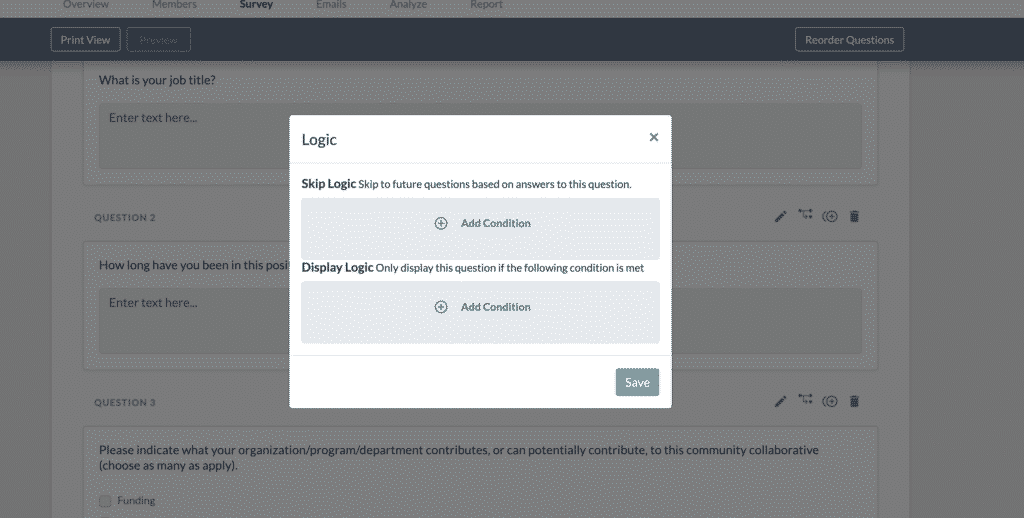
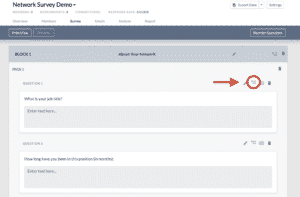
Display and Skip Logic are accessed via the Survey Builder page. Click “Survey” in the top navigation menu within any PARTNER project. Once your survey is open, look for the small logic icon above and to the right of each question. Clicking this will open the question logic menu. 

Note: You cannot use skip logic on open-ended questions – only multiple choice type questions support Skip Logic.

To set up skip logic, select an answer to the question that will trigger the Skip. Then select which question you would like the survey to skip forward to once triggered. 

To set up display logic, select a condition to trigger the display. You need to add your network members and attributes first in order to set up Display Logic.

Do you have a question about using Display and Skip Logic in PARTNER? Comment with your question below, visit our Support Page, or reach out to our team for more assistance. Thank you for using the PARTNER Platform!


Leave A Comment

Picture of About the Author: Alex Derr, MPA
About the Author: Alex Derr, MPA

Alex is Director of Marketing & Communications at Visible Network Labs. His interests include public policy, environmental conservation, and the intersection of grassroots advocacy and digital communication strategies.

Manage, Map, and Track Your Ecosystem with PARTNER CPRM!
PARTNER CPRM leverages network science methods and measures to capture relationship data, manage community partnerships, and map and analyze networks. The end result: stronger ecosystems and scaled collaborative impact. Start building partnerships with a network strategy: Learn more below!

Leave A Comment

Network Blind Spots Social Network Analysis

Managing & Tracking Your Community Partner Ecosystem

  • Set up your community partners in a unified database.
  • Build relational surveys to collect data and identify key players.
  • Measure trust, value, and perceptions across your ecosystem.
  • Inventory partner contributions to identify hidden assets.
Aug 13: Free “Chaos → Clarity” community partner-management webinar

Choose a Free Gift!

Click one of the links below to download a free resource to strengthen your community partnerships, collaborative network, and strategic ecosystem. 

Network Leadership Guide

Advice for building, managing, and assessing cross-sector networks or coalitions of partners.

Ecosystem Mapping Template

A template to map the connections and interactions between key stakeholders in your community.

Network Strategy Planner

A worksheet and guide to help you think through and develop your network or ecosystem strategy.

Subscribe to our Network Science Newsletter!

Get monthly updates on VNL news, new research, funding opportunities, and other resources related to network and ecosystem mapping and management.